Coaching App for Personal Trainers: Run Your Coaching From Your Phone
Coach+ gives every coach a dedicated coach app on iPhone and Android, included on all plans. See client workouts, check-ins and measurements as they happen, chat with clients, assign plans, analyze logged workouts with AI and run studio programming from your phone, all synced live with the web dashboard and your clients’ branded app.
Build My Coaching App30-day free trial · No credit card
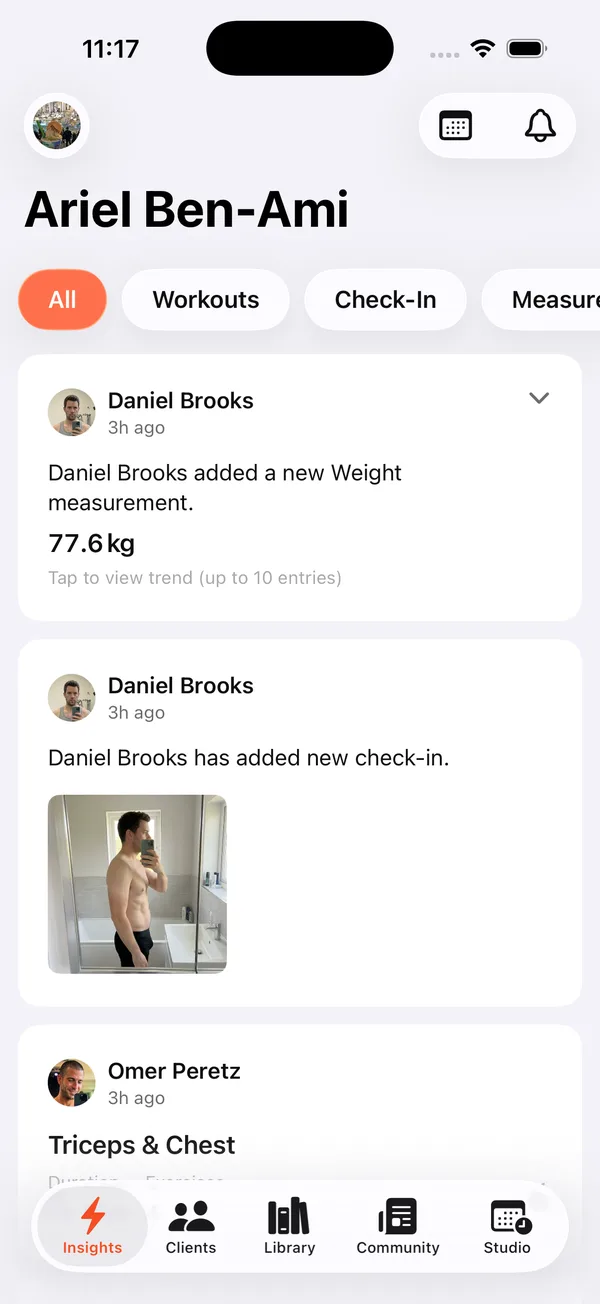
Coach+ is a coaching app for personal trainers on both sides of the relationship. Your clients get a branded app with your name, logo and colors. You get your own coach app on iPhone and Android to run your coaching from your phone.
Two apps and a web dashboard, one platform. A client logs a workout in your branded app, and it shows up in your coach app and in the dashboard at the same moment. Same clients, same plans, same chats everywhere.
Is there an app for coaches, not just clients?
Yes. Most coaching software gives clients an app and leaves the coach on a laptop. As a coaching app for personal trainers, Coach+ includes a dedicated personal trainer app for iPhone and Android on every plan, built for the coach’s side of the work.
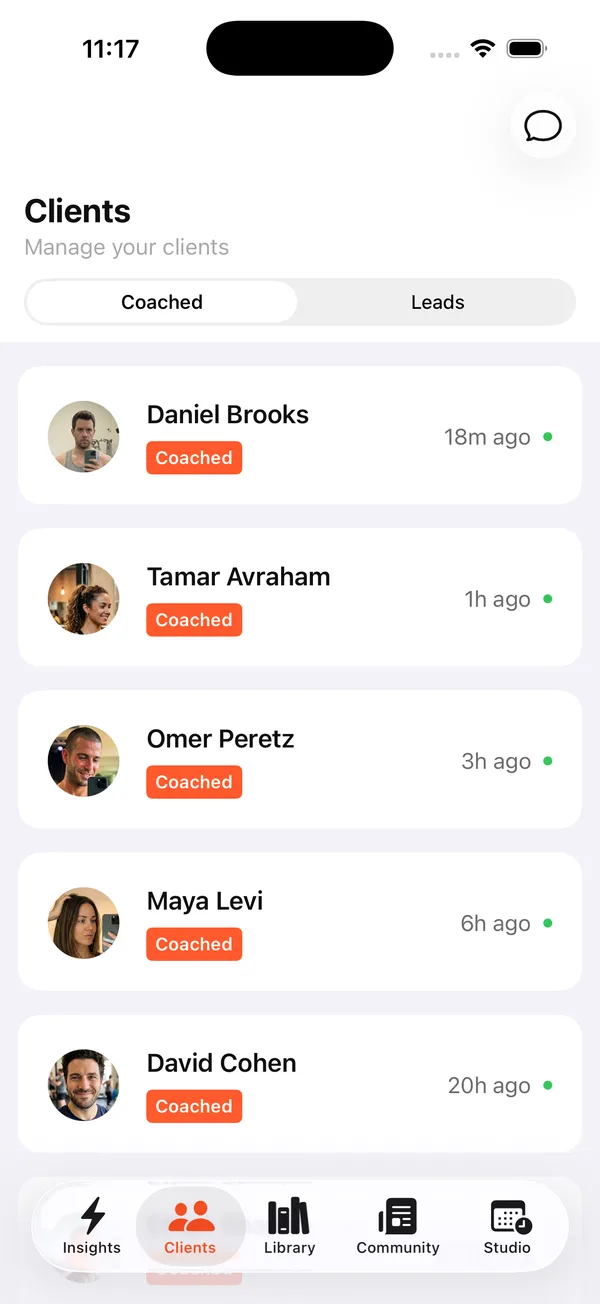
Open it between sessions and you see your client list, split into the clients you coach and your leads, with when each one was last active. Tap a client to manage everything about them.
What can you do from the coach app?
Almost all of your day-to-day coaching. Manage clients from your phone without opening a computer:
- Insights feed: finished workouts, check-ins with photos and new measurements from every client, filtered by All, Workouts, Check-In or Measurements.
- Clients: each client’s overview, progress, plans and profile, plus chat with them in one tap.
- Plans: assign plans from your Library of public and private plans, and edit plans in the plan editor on iPhone.
- Exercises: the exercise list with muscle diagrams, plus your own custom exercises.
- AI workout analyzer: one recommendation on a client’s logged workout, applied with one tap.
- Community and calendar: post to your private community feed and keep your 1:1 meetings on the calendar.
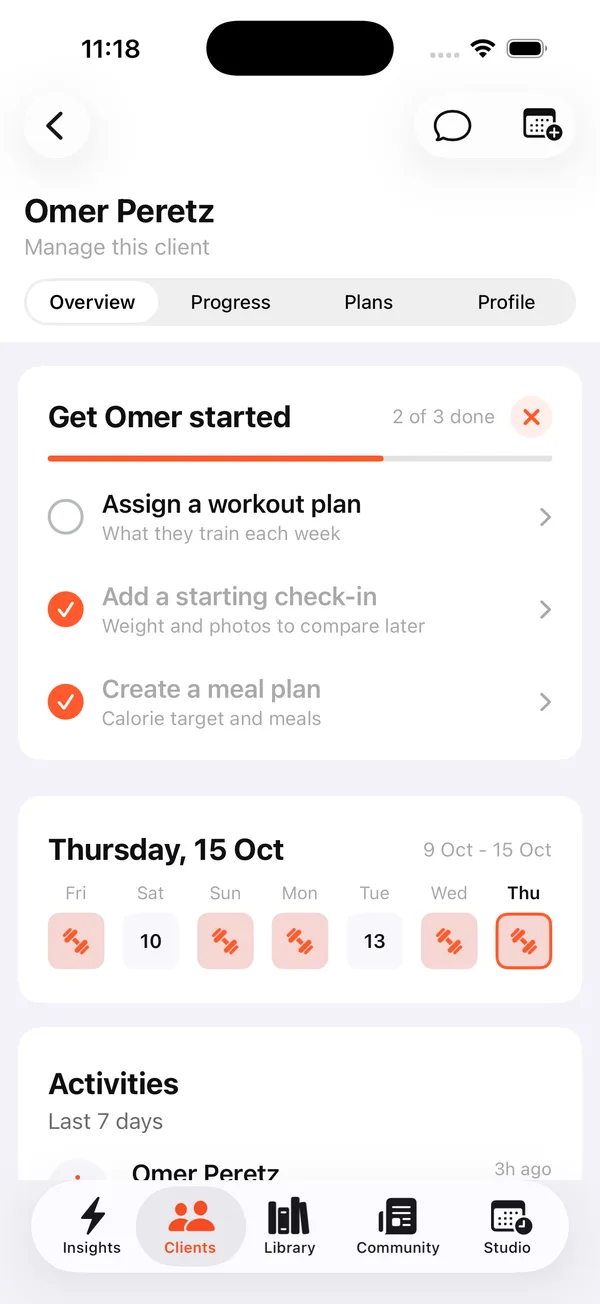
Client overview and the get-started checklist
Every new client gets a short checklist on their overview, such as “Get Omer started”: assign a workout plan, add a starting check-in with weight and photos to compare later, and create a meal plan. You see how many steps are done and tap any step to finish it.
Below it, a weekly calendar strip shows which days the client trained, followed by their recent activities. The Progress, Plans and Profile tabs hold the rest, and chat and scheduling are one tap away at the top.
Can I run a studio from my phone?
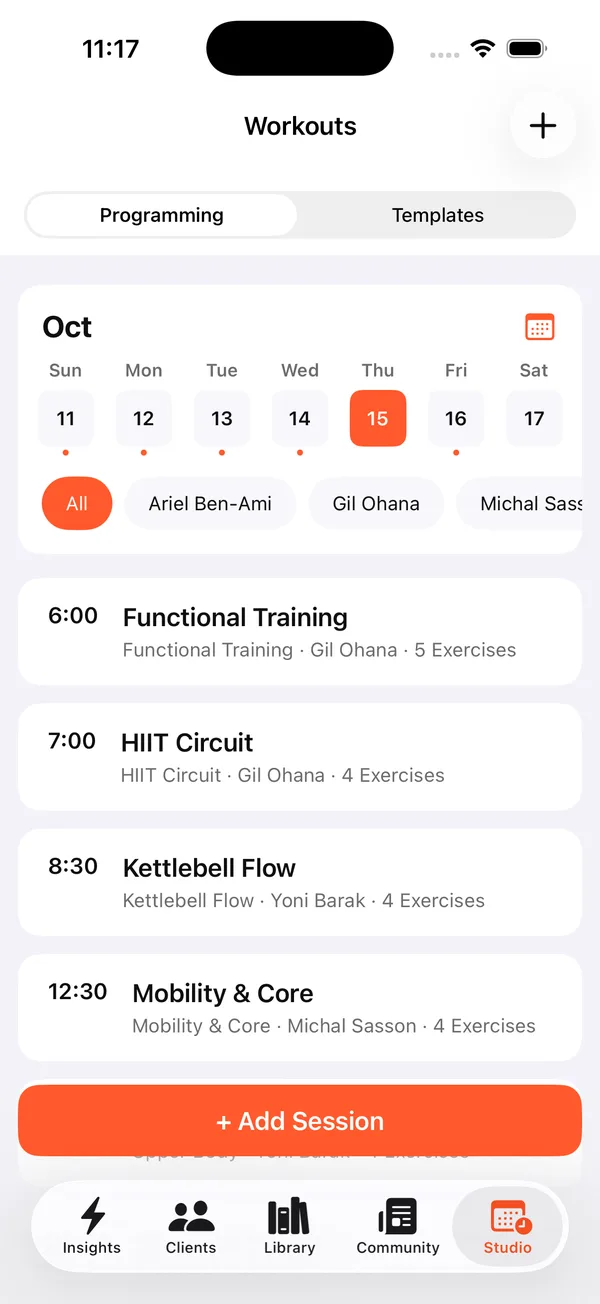
Yes. Studios get a Studio tab with a programming board by day. Pick a date and see every session with its time, workout, coach and number of exercises, filter by coach, and tap “+ Add Session” to schedule another. Reusable workouts live under Templates.
Is the AI workout analyzer in the coach app?
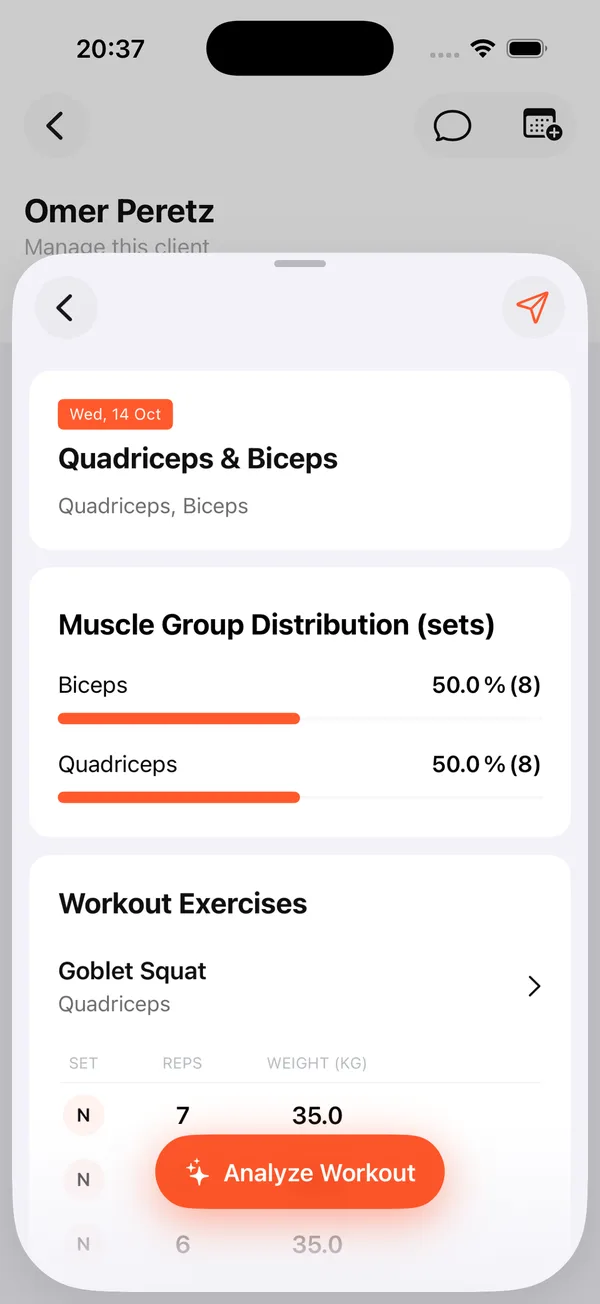
Yes, it lives there. Open a workout a client logged from their plan and you see the muscle group split and every set. Tap Analyze Workout and the AI compares the logged sets with the plan, then returns one recommendation with a short explanation and the old and new values. Tap to update the client’s plan, or ignore it. Nothing changes without you.
How do the coach app, the branded client app and the web dashboard connect?
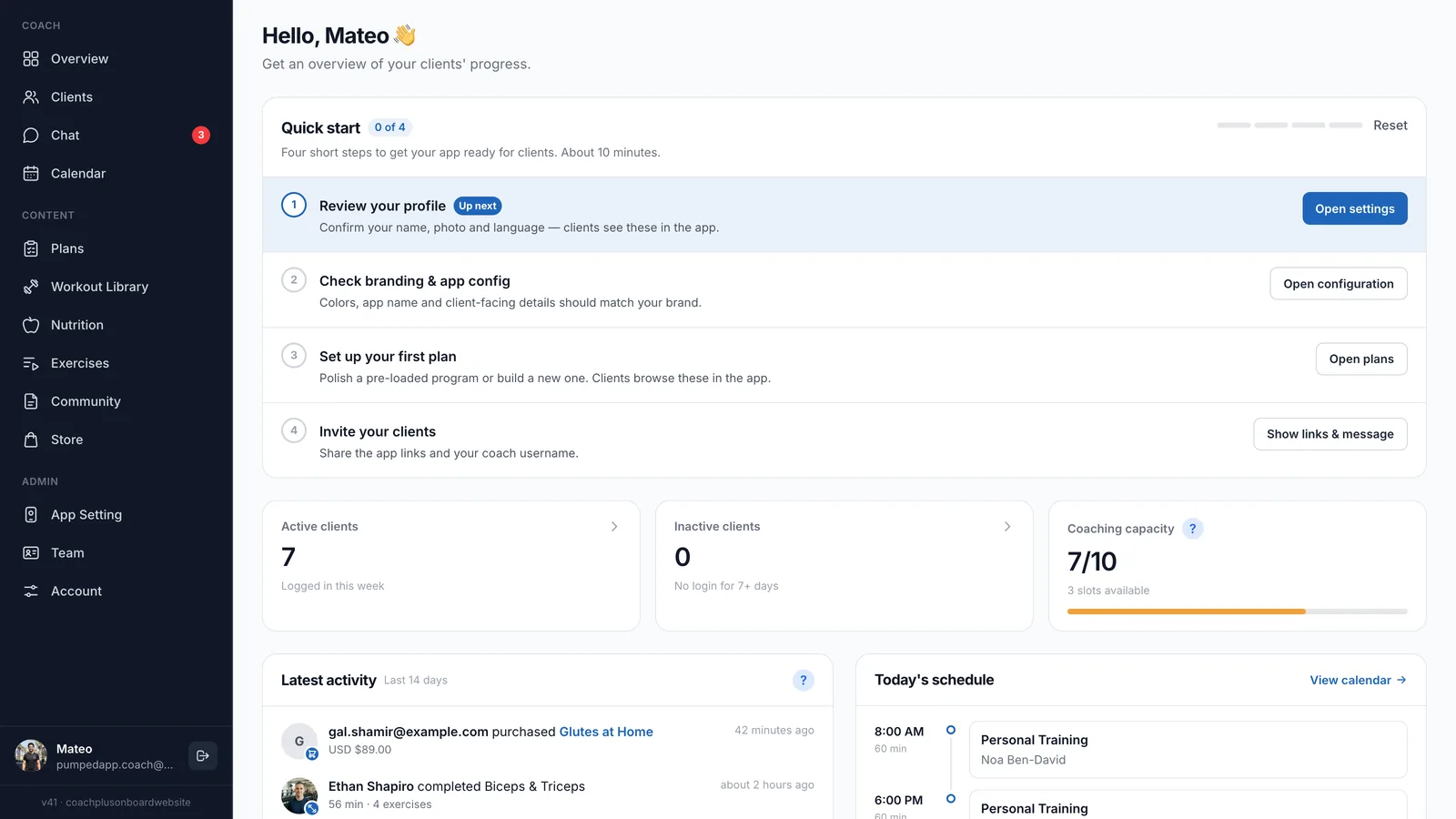
They are three views of the same data in the Coach+ coaching platform. Clients train, log food, check in and chat in your branded app. You follow and respond from the coach app. The web dashboard is where the heavier authoring happens: full program building, meal plans and AI that drafts programs and meal plans.
Build a plan on the dashboard and assign it from your phone. Reply to a chat on your phone and the thread is there on your laptop. Nothing to export, nothing to sync by hand. That’s what a coaching app for personal trainers should feel like: one system, wherever you are.
How to get started
- 1
Start your free trial
Sign up for Coach+ with no credit card. The trial runs for 30 days.
- 2
Set your branding
Upload your logo, choose your colors and name your clients’ app.
- 3
Download the coach app
Install it from the App Store or Google Play and sign in with your Coach+ account.
- 4
Add clients and assign plans
Invite clients, assign a plan, and follow their workouts and check-ins from your phone.
Frequently asked questions
Where do I download the coach app?
In the App Store and Google Play, where it is listed as “Lyft+ Coach”. Sign in with the same account you use on the Coach+ dashboard.
Which plans include the coach app?
All of them. Plans start at $39 a month, and every account starts with a 30-day free trial with no credit card.
Does it work on iPhone and Android?
Yes. The coach app is available for both. Plan editing is on iPhone and the web dashboard.
Does the coach app replace the web dashboard?
No, they work together and stay in sync: same clients, plans and chats. Full program building, meal plans and AI drafts are done on the web dashboard.
Is the coach app available in Hebrew?
Yes. Coach+ runs in English and in Hebrew, with full right-to-left support in Hebrew.
For coaches
Put your coaching in your pocket
Start a 30-day free trial with no credit card and run your clients from your phone, your laptop and their branded app.

For your clients
Their own app, with your brand
Clients open today’s workout, log every set, follow their meal plan and check in. Everything lands on your dashboard.
Online coaching platform for personal trainers