Online Coaching Dashboard: Every Client’s Progress in One Place
Coach+ gives you an online coaching dashboard that shows which clients logged in this week, who hasn’t logged in for 7+ days, what each client completed and today’s schedule. Each client profile adds check-in photos with weight, training volume per muscle group, measurements, their program, meal plan and a direct chat.
Build My Coaching App30-day free trial · No credit card
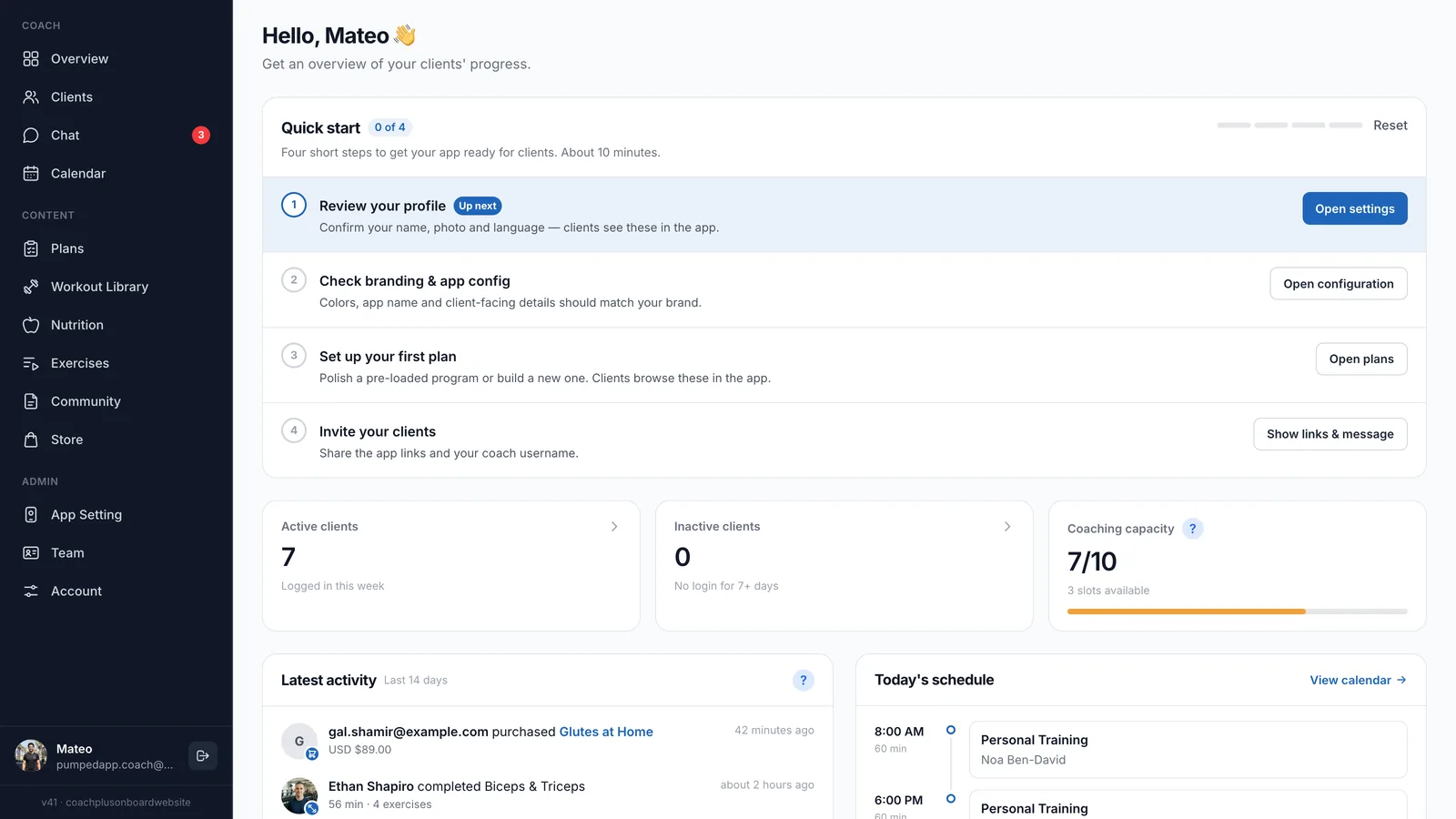
The Coach+ online coaching dashboard is the first screen you see after logging in. It answers the daily questions in one view: who trained, who stopped showing up, what happened in the last two weeks and who you’re seeing today.
One click on a client opens their profile, with tabs for overview, measurements, training volume, check-in, program, meal plan and profile. This page walks through each screen and how coaches use it for client progress tracking.
What does the coach dashboard show when you log in?
The overview shows how your coaching business is doing today, without opening each client. It’s built from the workouts, check-ins and bookings your clients make in the app.
- Active clients: how many clients logged in this week.
- Inactive clients: clients with no login for 7+ days, so you can reach out before they drop off.
- Coaching capacity: how many client slots you use out of your plan’s limit.
- Latest activity: the last 14 days of completed workouts (with duration and number of exercises) and store purchases.
- Today’s schedule: your sessions for the day, with a link to the full calendar.
New accounts also get a quick start checklist: review your profile, check branding and app settings, set up your first plan and invite clients. It takes about 10 minutes.
How do you see one client’s progress at a glance?
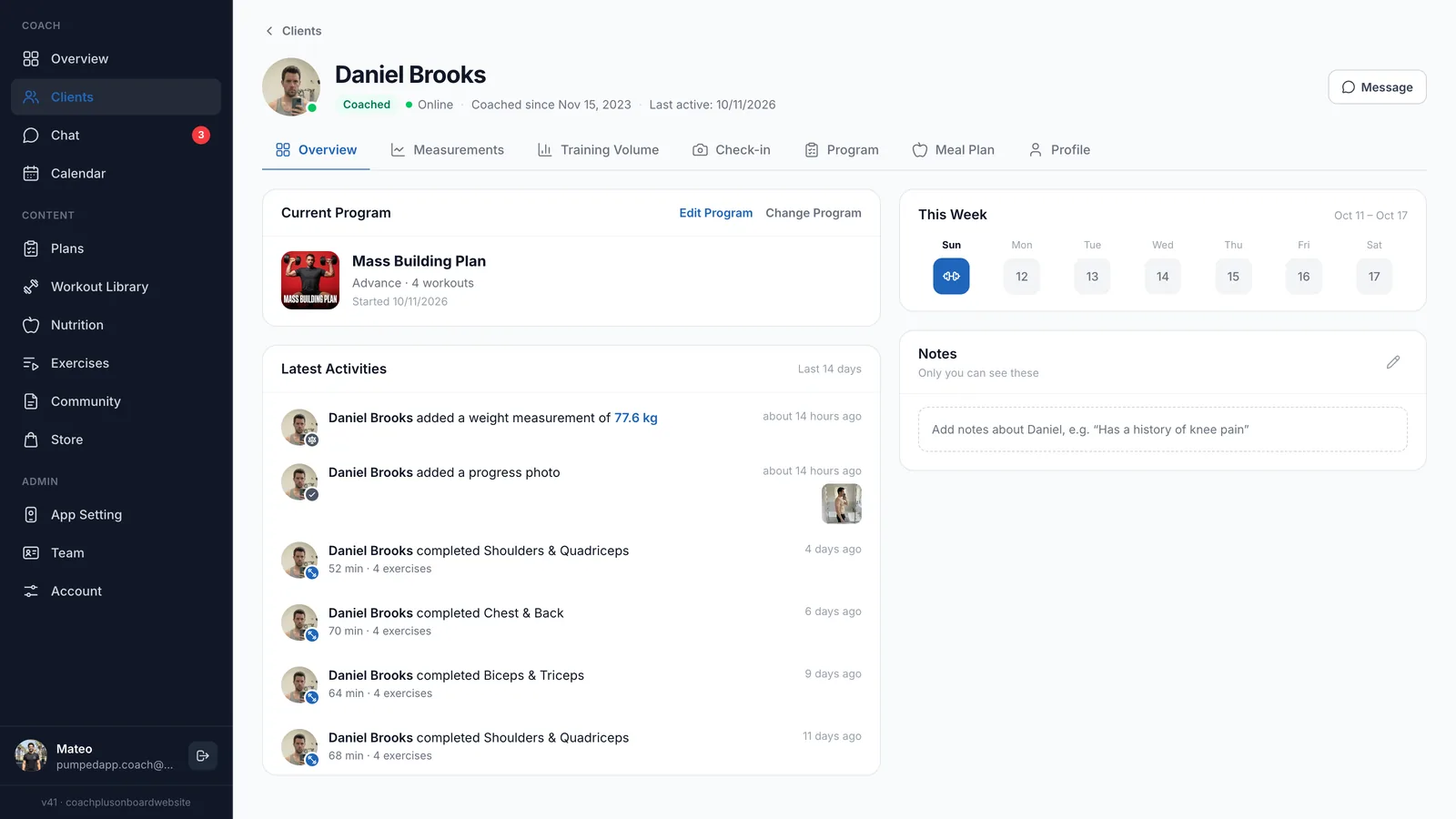
Open the client’s Overview tab. It shows their current program with buttons to edit or change it, the training days of the current week, and a feed of their latest activity: weight measurements, progress photos and completed workouts with duration and exercise count.
A Notes card on the same screen holds private notes only you can see, such as an old knee injury, so the context is there before every session or reply.
How does client progress tracking work with check-ins?
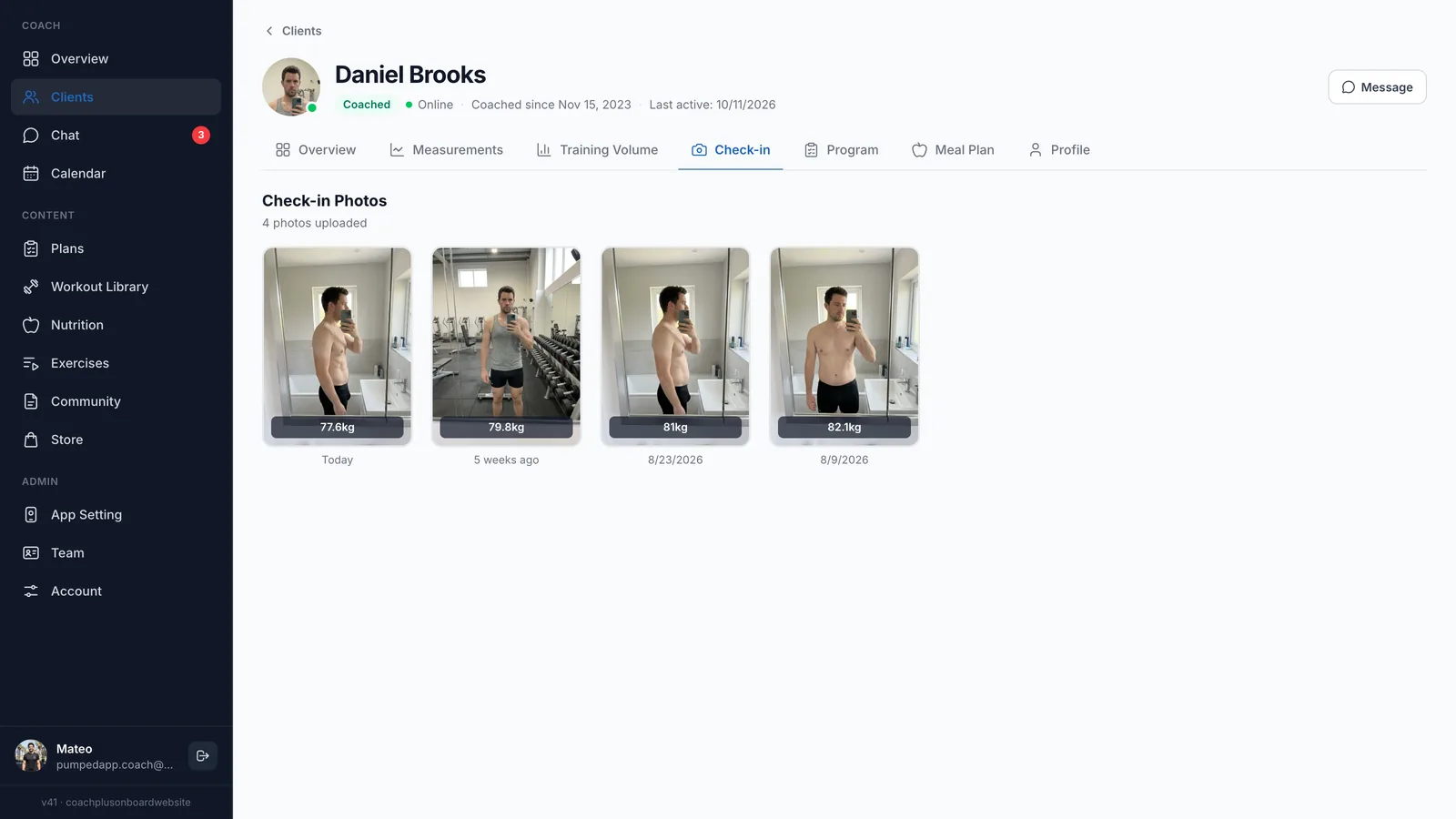
Clients send weekly check-ins with progress photos from the app, and each photo lands in the client’s Check-in tab labeled with their weight and date. Scrolling across the row shows the change from the first check-in to today.
Clients see their own check-in photos side by side in the app too, along with their weight change and streaks. For what to ask in a weekly check-in, see our guide to online coaching check-in questions.
Can I see if a client’s training volume is going up?
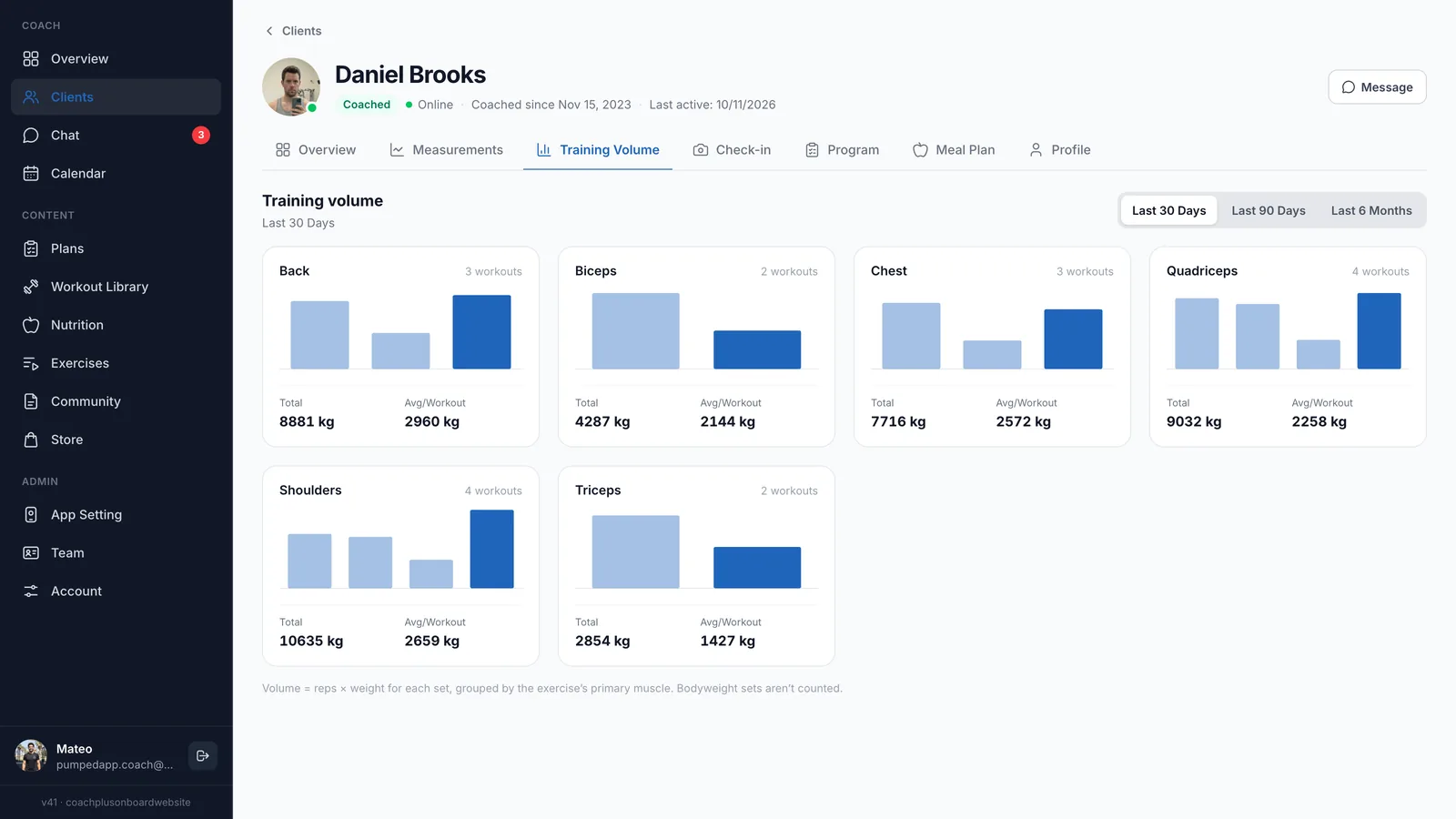
Yes. The Training Volume tab shows a chart for each muscle group, such as back, chest, quadriceps and shoulders, with the number of workouts, the total volume and the average per workout. Switch between the last 30 days, 90 days and 6 months.
Volume is reps × weight for every logged set, grouped by the exercise’s primary muscle, and bodyweight sets aren’t counted. Since clients log each set in the app, the numbers fill in without any extra work from you.
Can I message clients from the dashboard?
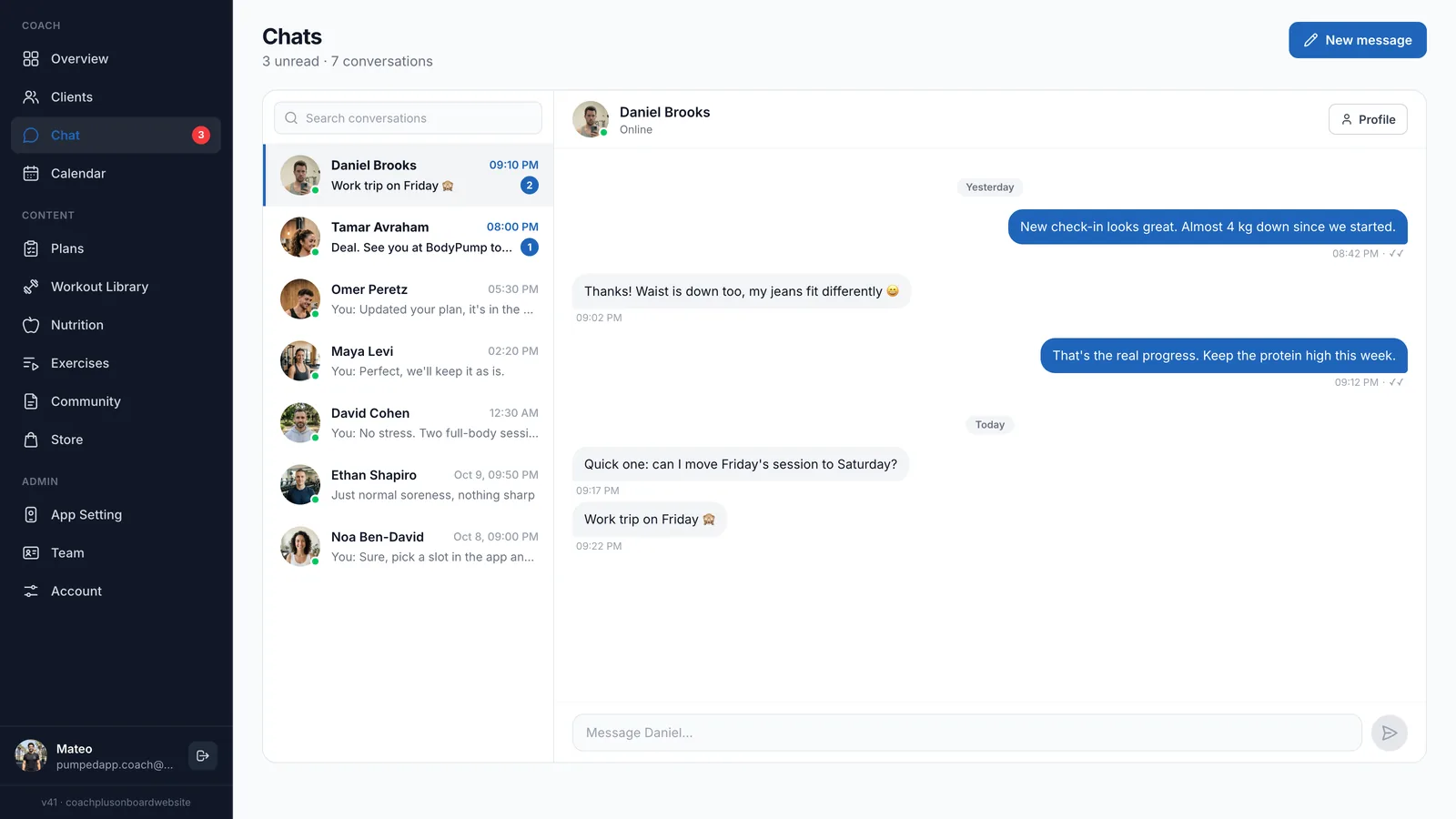
Yes. Chat has its own page with every conversation, an unread count and a search, and every client profile has a Message button. Clients get your messages in the app with a push notification.
Keeping chat inside the same online coaching dashboard means the reply sits next to the data: you can open a client’s profile from the conversation and check their latest check-in before answering.
How to get started
- 1
Sign up free
Start a 30-day free trial of the Coach+ coaching platform. No credit card needed.
- 2
Set your branding
Add your logo, colors and app name so clients see your brand in the app.
- 3
Add clients
Share your app links and coach username from the quick start, and clients join.
- 4
Build and assign a plan
Create a program or meal plan for each client. Their workouts and check-ins start showing on the dashboard as they use the app.
Frequently asked questions
How much does the Coach+ online coaching dashboard cost?
Plans are $39/month for up to 10 clients (Essentials), $89 for up to 45 (Growth) and $199 for up to 150 (Ultimate). Messaging is included from Growth, and paying yearly saves 10%.
Is there a free trial?
Yes. You get 30 days free with no credit card, so you can add real clients and see their data come in.
What do my clients need to use?
Clients use an app under your brand: a branded web app on every plan, and native iOS and Android apps on the Ultimate plan. Their workouts, check-ins and messages feed your dashboard.
Does the dashboard work in Hebrew?
Yes. The dashboard and the client app both work in English and in Hebrew, laid out right to left.
I track clients in a spreadsheet today. How hard is it to switch?
Add your clients and assign their programs, and the dashboard fills in from what they log. The AI assistant can turn existing Excel or PDF programs into plans you review and edit.
For coaches
See all your clients on one screen
Start a 30-day free trial of Coach+, no credit card needed.

For your clients
Their own app, with your brand
Clients open today’s workout, log every set, follow their meal plan and check in. Everything lands on your dashboard.
Online coaching platform for personal trainers