Meal Planning Software for Coaches, With Macros Calculated as You Build
Coach+ is meal planning software for coaches that lets you build a client meal plan from a built-in food database, your own custom foods, ready templates or an AI draft. Calories, protein, carbs and fat add up as you go, and clients see the plan in their app and tick off each food they eat.
Build My Coaching App30-day free trial · No credit card
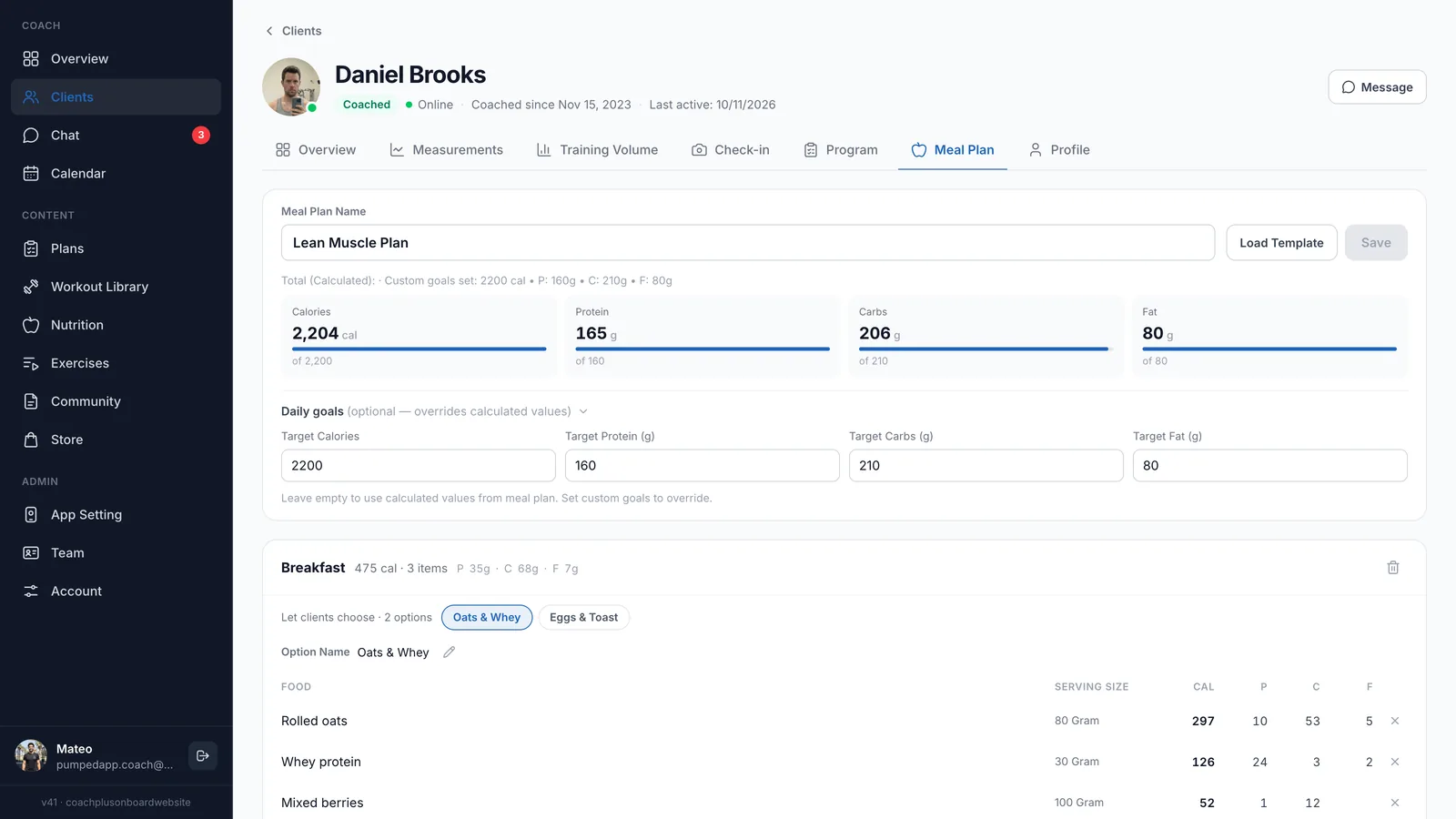
Coach+ is meal planning software for coaches who want nutrition to sit next to training, not in a separate PDF. You build each client’s meal plan inside their profile, set daily calorie and macro goals, and the plan shows up in the client’s app once you save it.
It’s made for personal trainers, online coaches and studios that give nutrition guidance as part of coaching. Below you’ll see how the editor works, where foods come from, how templates and AI save time, and what clients see on their phone.
How does a client meal plan look in Coach+?
A meal plan is a named plan (for example “Lean Muscle Plan”) made of meals, and each meal is a list of foods with a serving size. Coach+ calculates calories, protein, carbs and fat for every food, every meal and the whole day, so you never add numbers by hand.
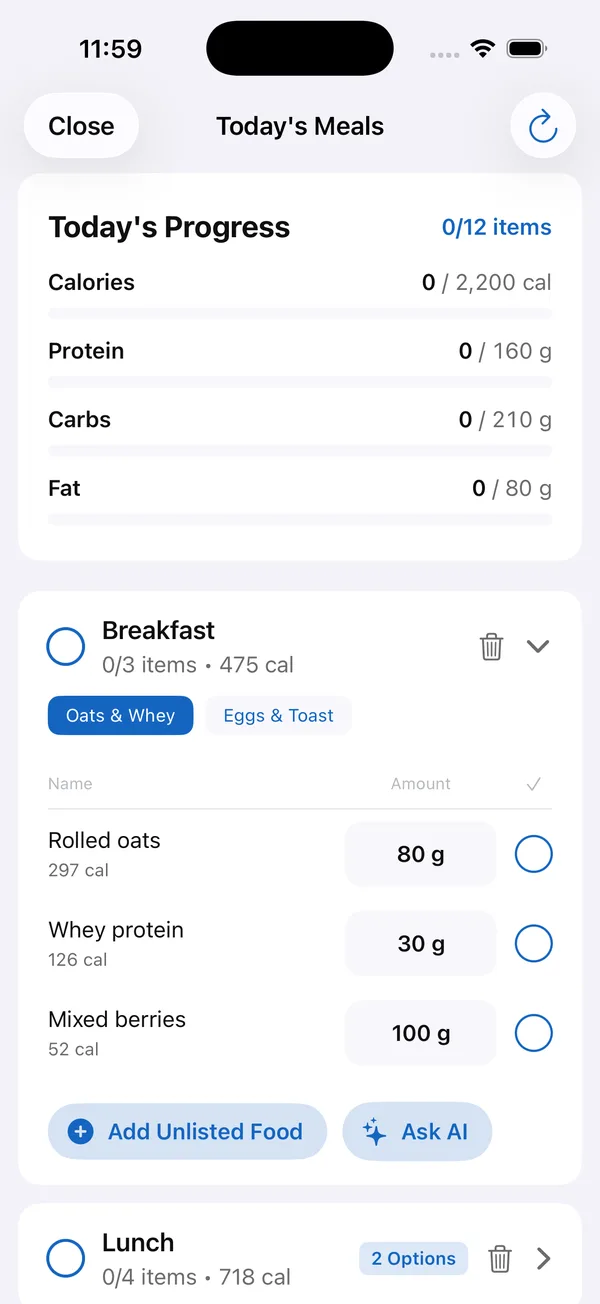
- Daily goals: set target calories, protein, carbs and fat, or leave them empty and use the totals calculated from the plan. Progress bars show how close the plan is to each goal.
- Meal options: give clients a choice inside a meal, such as Oats & Whey or Eggs & Toast for breakfast. Each option has its own foods and name.
- Coach notes: add notes to a meal for anything the numbers don’t cover, like how to prepare it.
Where do the foods come from?
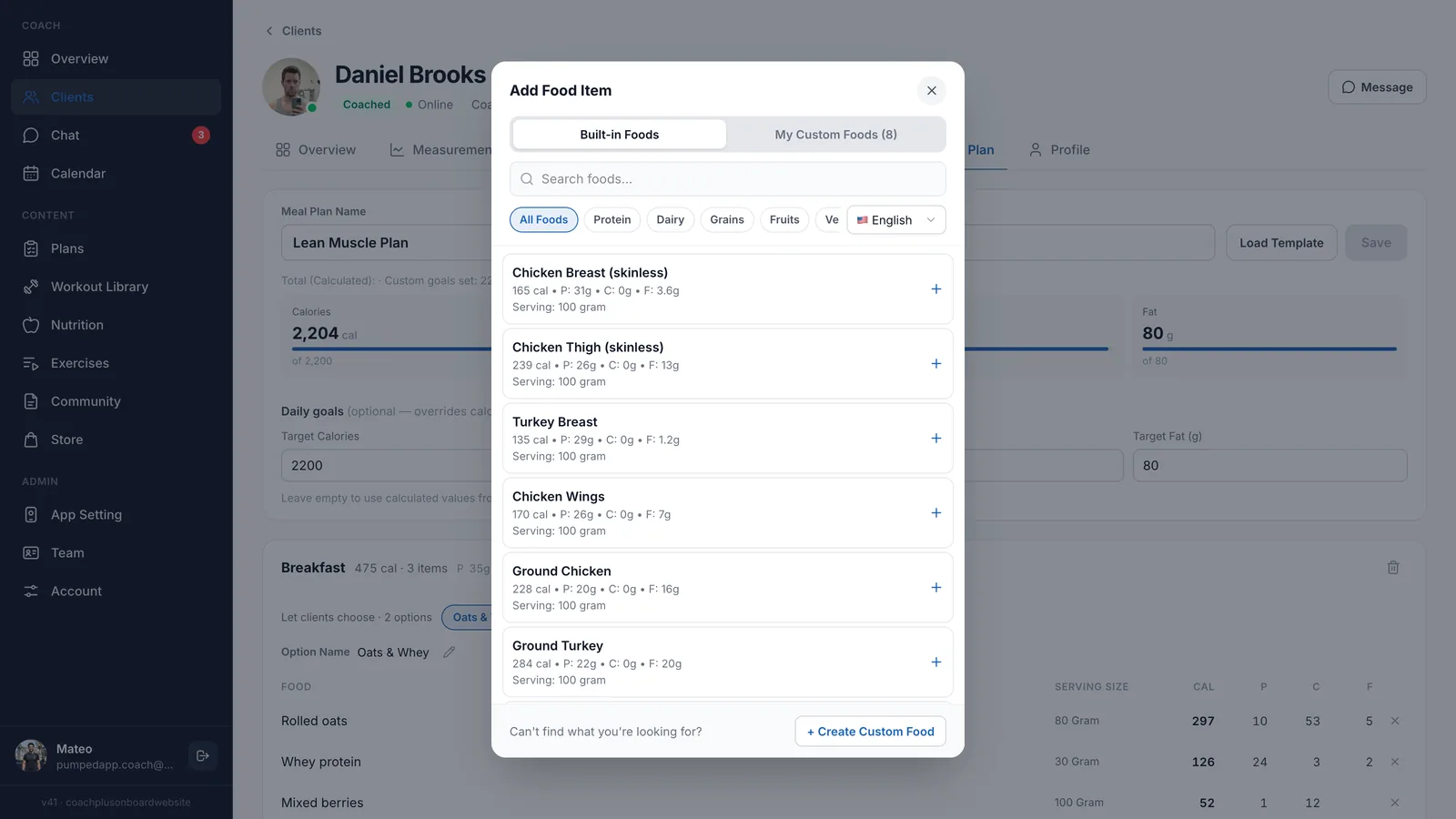
Foods come from a built-in food database or from your own custom foods. Search by name, filter by category (protein, dairy, grains, fruits and more) and add a food with one click. Each result shows calories, protein, carbs and fat per serving.
Food names are available in English and Hebrew. If a food isn’t there, create a custom food once and it stays in your “My Custom Foods” tab for every future plan.
Can I reuse a meal plan for several clients?
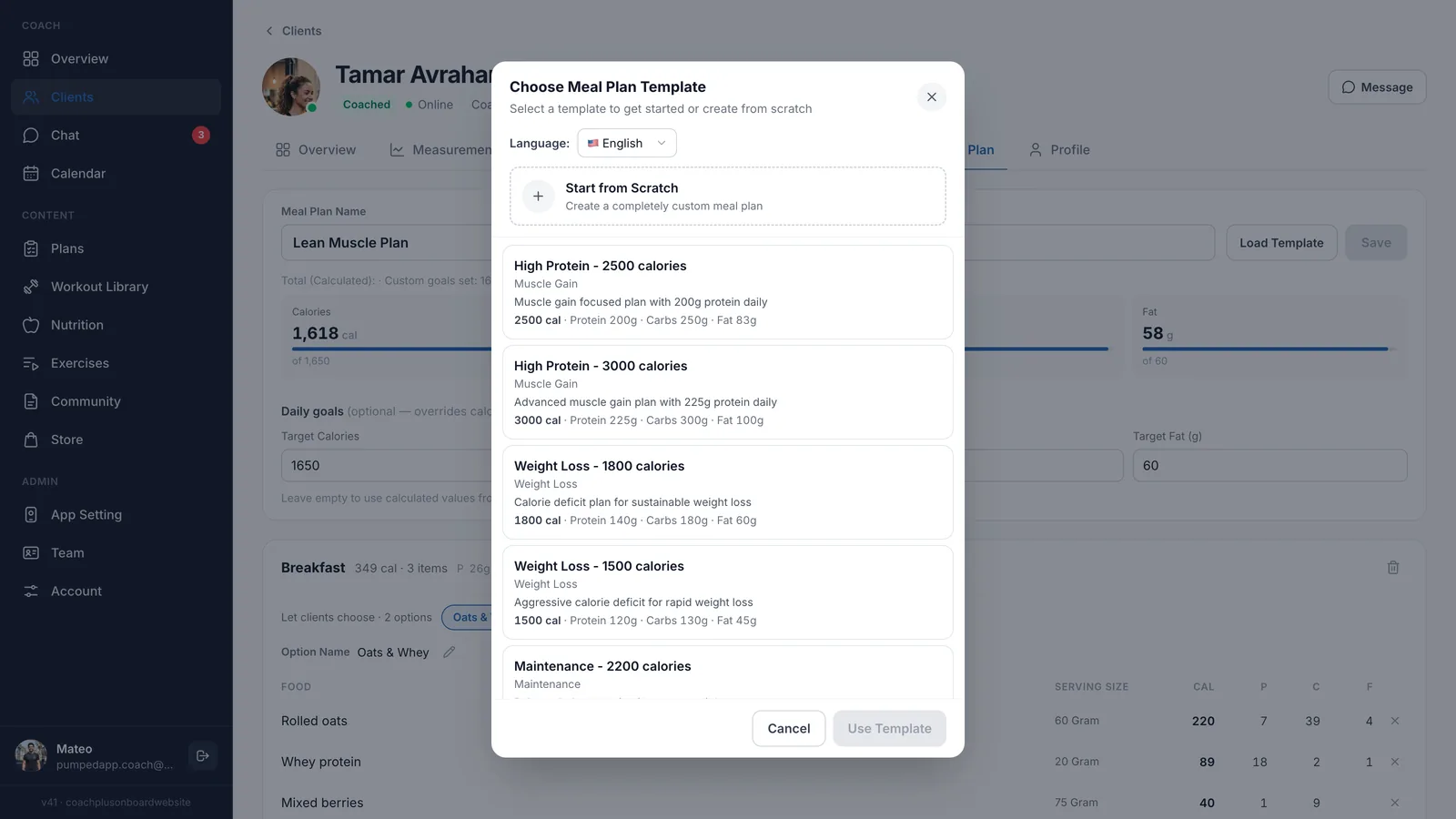
Yes. Click “Load Template” on any client and pick a meal template, or start from scratch. Templates are grouped by goal, such as muscle gain, weight loss and maintenance, and show calories and macros before you load them.
After loading, adjust portions and foods for that client and save. The template stays unchanged, so the next client starts from the same clean version. This is where meal planning software saves the most time once you coach more than a handful of people.
How does the AI help with nutrition coaching?
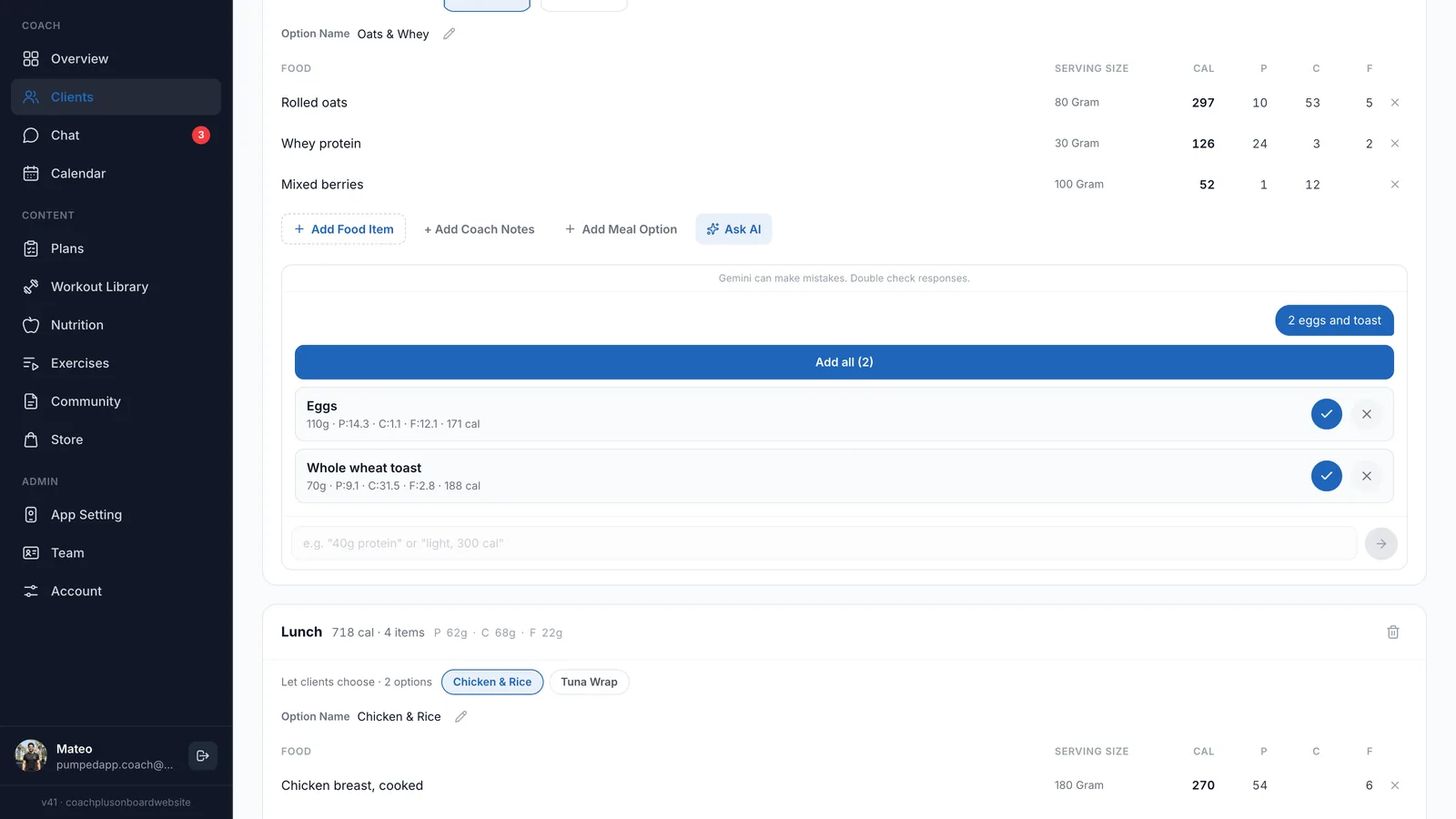
You describe what you want in plain words and the AI drafts it, then you decide what stays. Inside a meal, type something like “2 eggs and toast” and the AI suggests matching foods with amounts and macros from a database of 50,000+ food items. Approve or remove each one, or add them all at once.
The AI assistant can also draft a full meal plan from a short description of the client and their goal. Nothing reaches the client until you review and edit it, which keeps this nutrition coaching software fast without taking the decisions away from you.
What do clients see in the meal plan app?
Clients open Today’s Meals in their app and see each meal with its foods, amounts and calories, plus their progress toward the day’s calories, protein, carbs and fat. They tick off each food as they eat it and switch between the meal options you gave them.
- Food logging: clients can add food that isn’t on the plan by barcode, photo or search.
- Your brand: the app carries your logo, colors and app name, so the meal plan app for clients looks like your own.
- Activity data: water and steps come in from Apple Health or Google Fit.
How to get started
- 1
Sign up free
Start a 30-day free trial of the Coach+ coaching platform. No credit card needed.
- 2
Set your branding
Add your logo, colors and app name so clients see your brand in the app.
- 3
Add clients
Share your app link and coach username, and clients join your space.
- 4
Build and assign a meal plan
Open the client’s Meal Plan tab, load a template or start from scratch, adjust foods and goals, and save.
Frequently asked questions
Which Coach+ plan includes the meal planning software?
Nutrition and meal planning are part of the Growth plan ($89/month, up to 45 clients) and the Ultimate plan ($199/month, up to 150 clients). Paying yearly saves 10%.
Is there a free trial?
Yes. Every new account gets a 30-day free trial, and you don’t need a credit card to start.
Can I change a meal plan after the client has it?
Yes. Open the client’s Meal Plan tab, change foods, amounts or goals, and save. The client sees the updated plan in their app.
Does it work in Hebrew?
Yes. The dashboard and the client app work in English and Hebrew (right to left), and food names in the database are available in both languages.
I write meal plans in Excel or PDF today. Do I have to start over?
You can rebuild them quickly from a template and the food search, or describe the plan to the AI assistant and edit its draft. After that, each new client takes a few changes instead of a new file.
For coaches
Build your first client meal plan free
Try the Coach+ meal planner for 30 days, no credit card needed.

For your clients
Their own app, with your brand
Clients open today’s workout, log every set, follow their meal plan and check in. Everything lands on your dashboard.
Online coaching platform for personal trainers