Personal Trainer Client Tracker: Check-Ins, Progress Photos and Measurements
Coach+ is a personal trainer client tracker built into your coaching dashboard. Each client profile collects check-in photos with their weight, a chart for every body measurement, training volume per muscle group and recent workouts. Clients see their own check-ins and streaks in your branded app, so progress is visible on both sides.
Build My Coaching App30-day free trial · No credit card
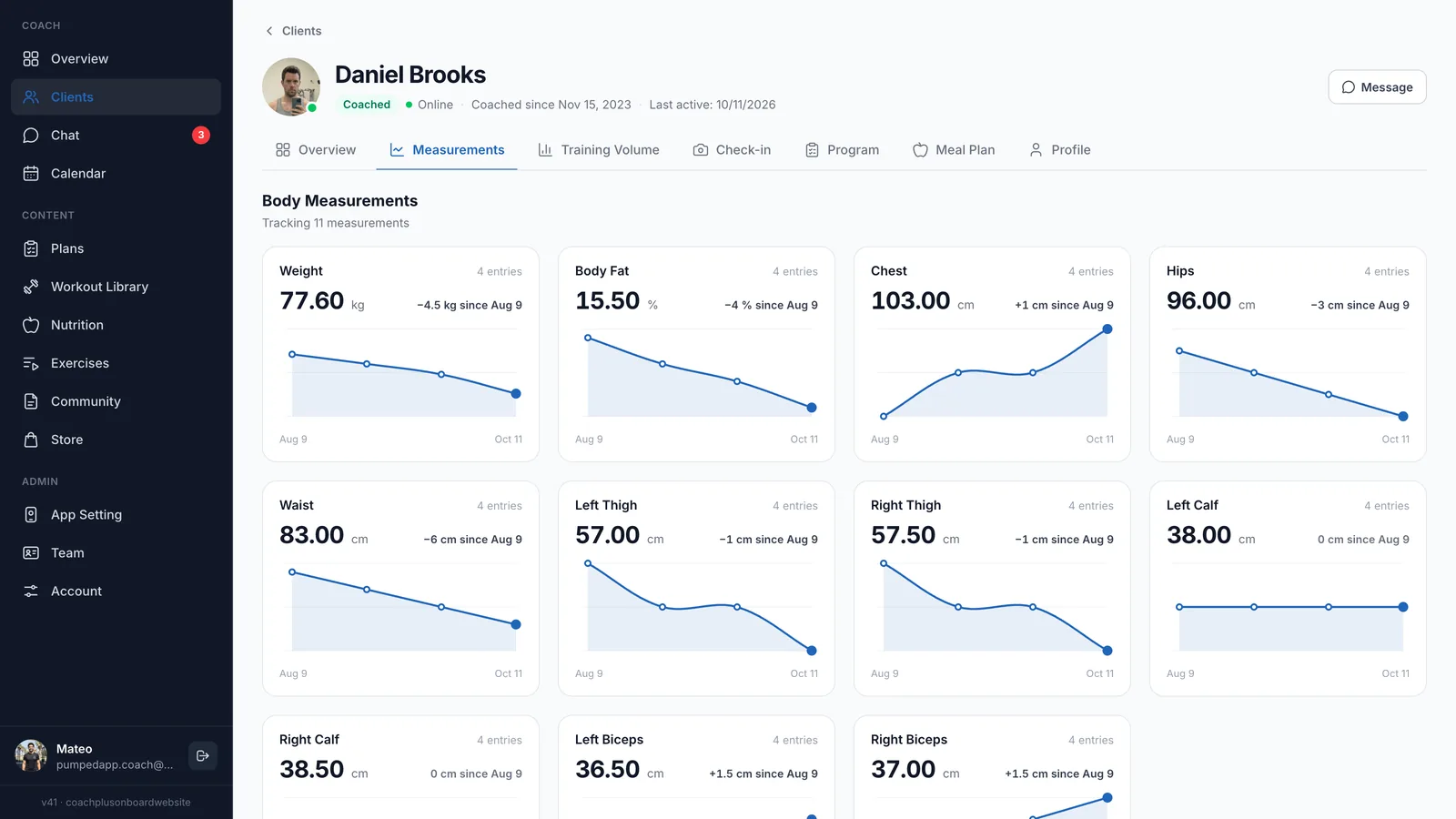
A personal trainer client tracker should answer one question fast: is this client getting results? In Coach+, every client has one profile with tabs for Overview, Measurements, Training Volume, Check-in, Program and Meal Plan, so the answer is a click away instead of buried in a spreadsheet or a chat thread.
Clients fill it in from their phone. They log workouts, add measurements and upload progress photos in your branded app, and it all lands in their profile on your dashboard.
What can you see for each client?
A personal trainer client tracker works best when everything about one client sits on one page. In the Coach+ coaching platform, the Overview tab shows the client’s current program with Edit Program and Change Program, this week’s training days, the latest activity from the last 14 days and private notes that only you can see.
Latest Activities is the quickest check: new weight entries, new progress photos and every completed workout with its length and number of exercises, so you notice who is training and who has gone quiet.
How does Coach+ track body measurements?
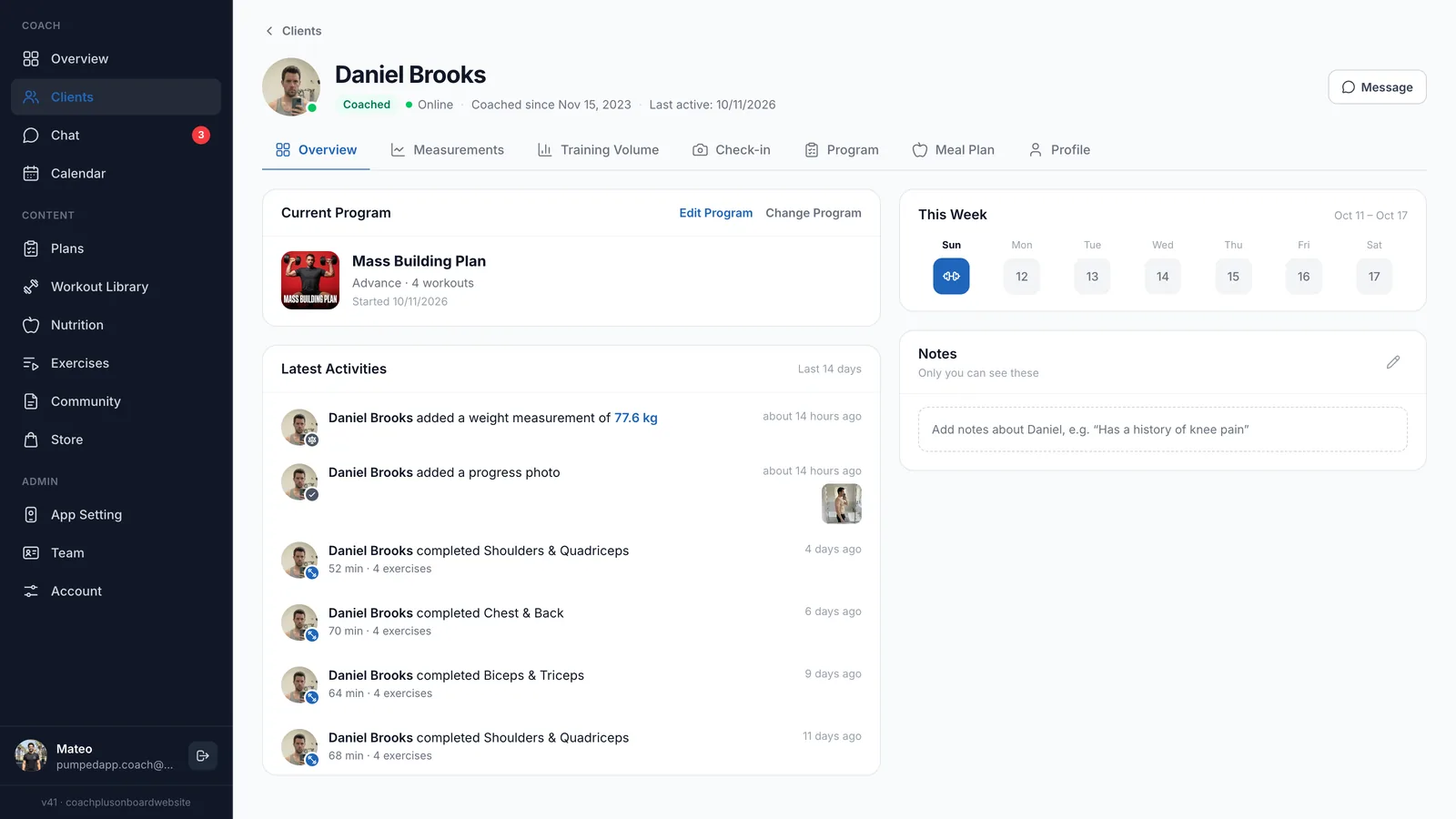
Each measurement gets its own card with the current value, the change since the first entry, the number of entries and a chart over time. Weight, body fat, chest, hips and waist sit next to left and right thigh, calf and biceps, so uneven changes are easy to spot.
- Weight and body fat: see whether the scale and body fat are moving together.
- Waist and hips: often the first sign of fat loss when the scale stalls.
- Limbs, left and right: thighs, calves and biceps tracked per side.
How do weekly check-ins and progress photos work?
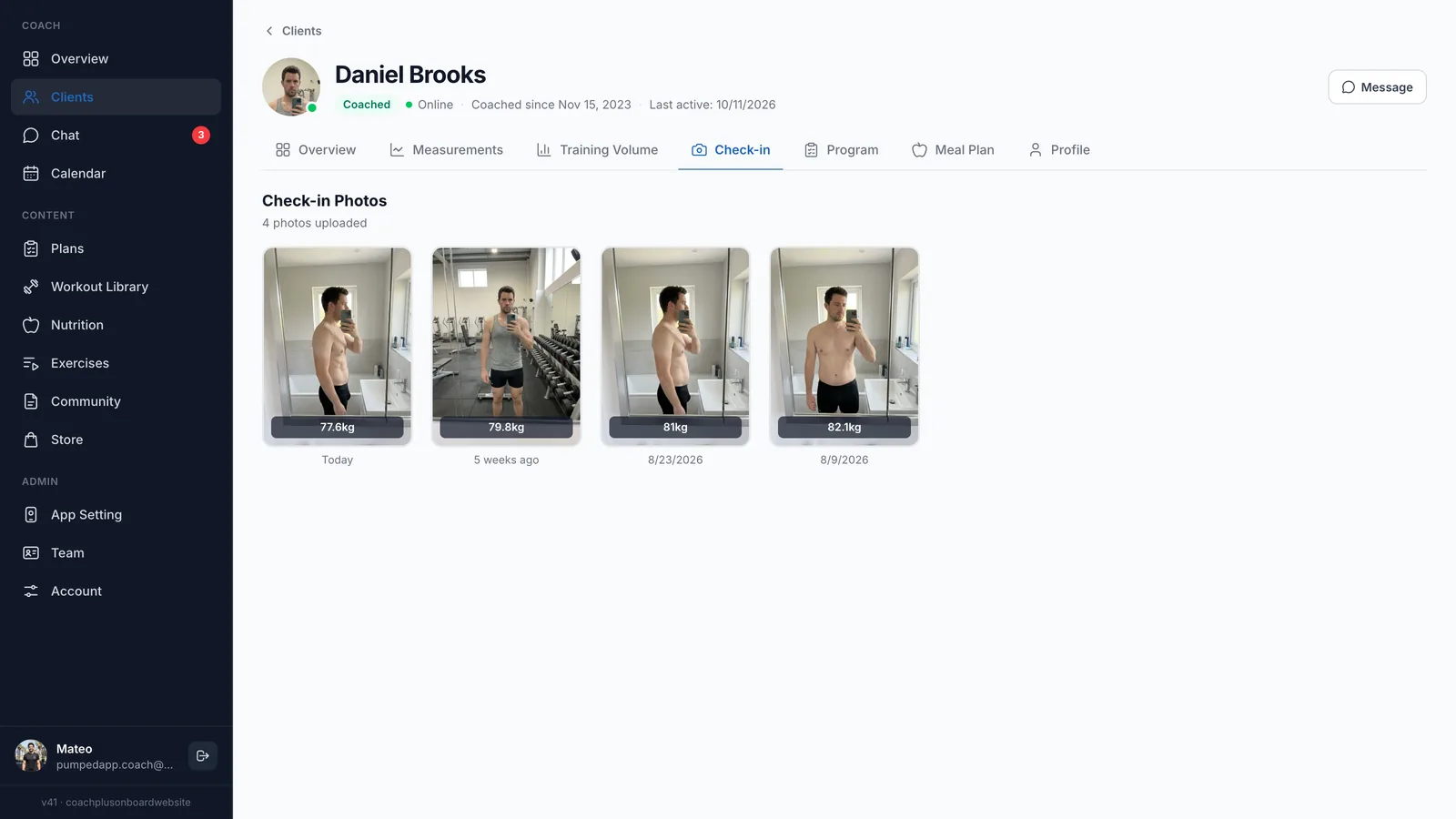
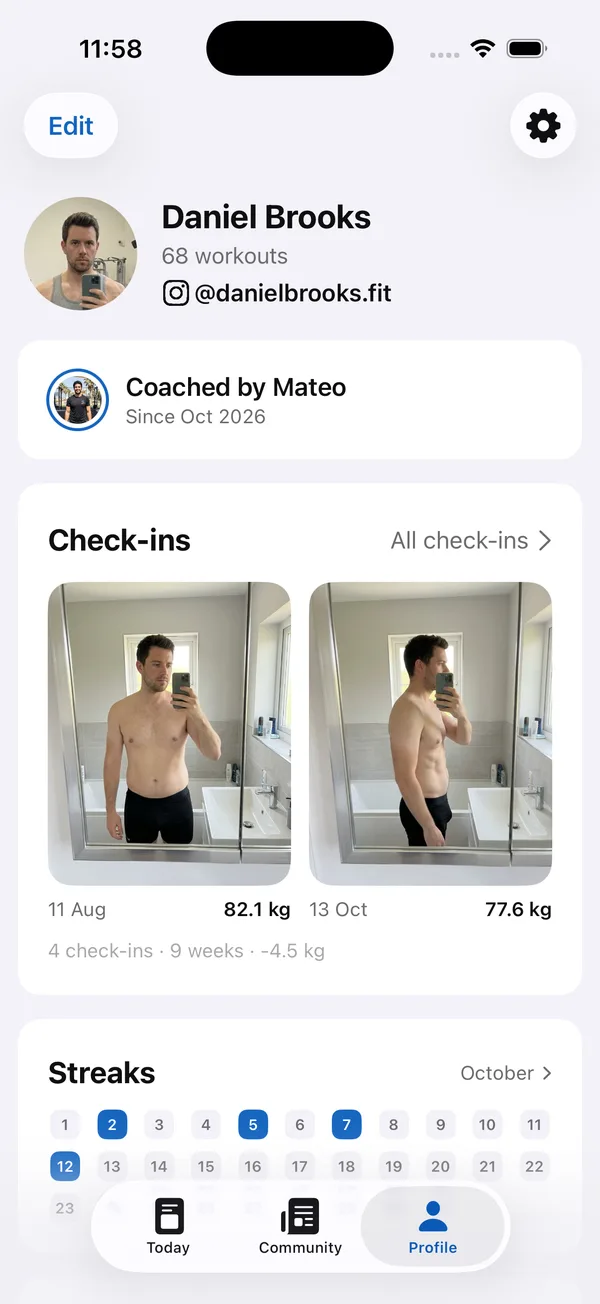
Clients upload a progress photo with their weight from the app, and the Check-in tab lines up every photo with its weight and date. In the example, Daniel goes from 82.1 kg on Aug 9 to 77.6 kg today across four photos, which tells you more than any number on its own.
A weekly rhythm works best: same day, same light, same pose. For what to ask alongside the photo, see our guide to online coaching check-in questions.
Can you track training progress, not just body weight?
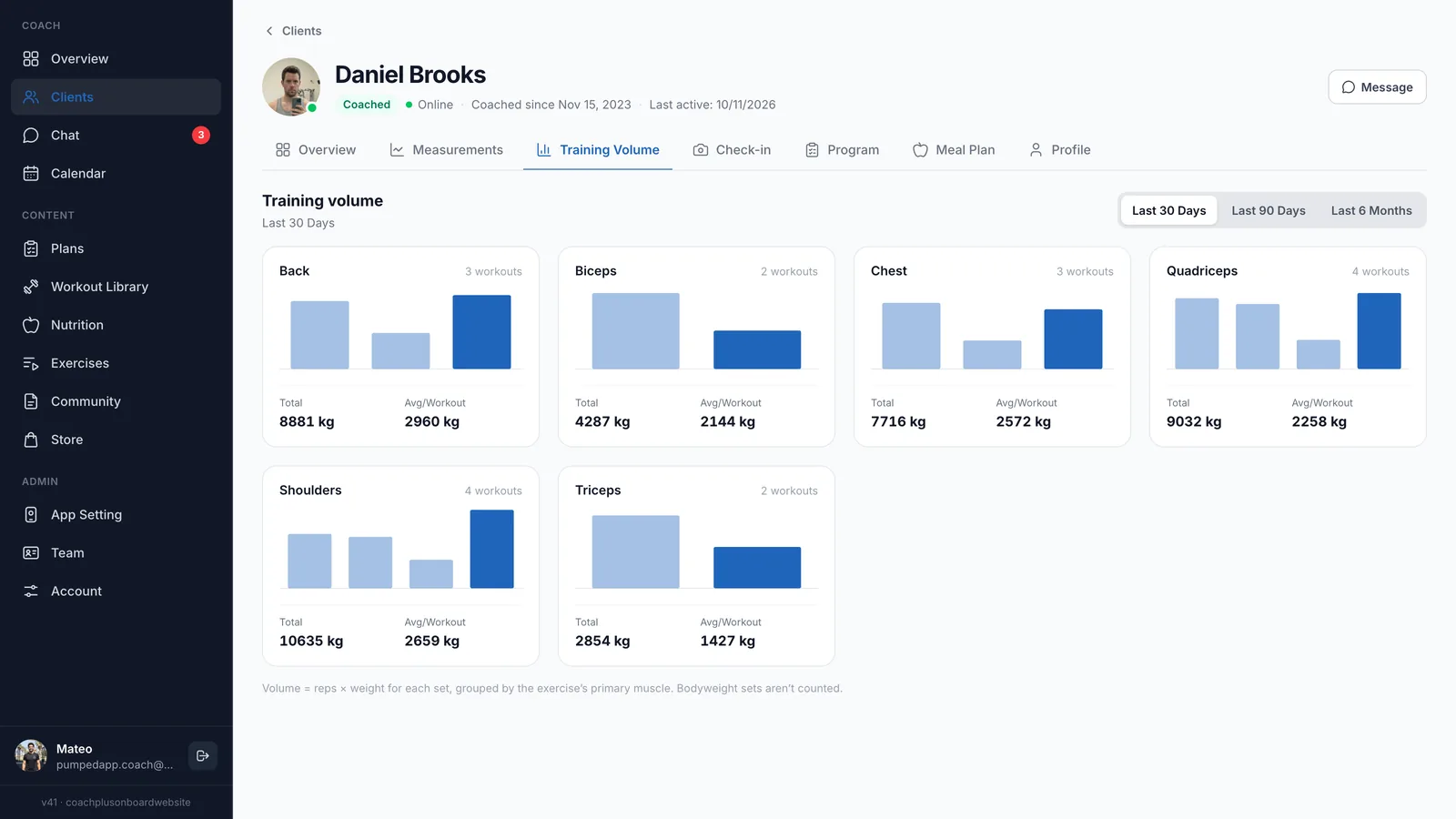
Yes. The Training Volume tab adds up reps × weight for every logged set and groups it by the exercise’s primary muscle, with the number of workouts, total volume and average per workout for each muscle group. Switch between the last 30 days, 90 days and 6 months to see whether volume is going up.
To act on a single session, open the client’s logged workout in the Coach+ coach app and tap Analyze Workout. The AI workout analyzer compares the sets against the plan and suggests one change for the whole workout, which you apply to the plan with one tap or ignore.
Do clients see their own progress?
Yes. A personal trainer client tracker works better when clients can see it too: the Profile tab in your app shows them their workout count, who coaches them, their first and latest check-in photos with the weight change, and a monthly streak calendar. Seeing 82.1 kg next to 77.6 kg nine weeks later is a strong reason to keep logging.
The same app holds their meal plan. Clients check off meals or log food with the AI, calories and macros fill against your targets, and you see it in the client’s Meal Plan tab.
How to get started
- 1
Start your free trial
Sign up for Coach+ with no credit card. The trial runs for 30 days.
- 2
Set your branding
Upload your logo, choose your colors and name your app.
- 3
Add a client and follow the checklist
Each new client gets a Get started checklist: assign a plan, take a starting check-in and add a meal plan. The AI assistant can draft the program and meal plan for you to review.
- 4
Review progress weekly
Open the client’s profile to see new check-ins, measurement charts and training volume as they log.
Frequently asked questions
How much does the Coach+ client tracker cost?
Plans are $39 a month for up to 10 clients (Essentials), $89 for up to 45 (Growth) and $199 for up to 150 (Ultimate). Paying yearly saves 10%.
Is there a free trial?
Yes. You get 30 days free with no credit card, so you can track real clients before you pay.
Do clients need to download an app?
On every plan, clients use your branded web app straight from their phone. On Ultimate they can also install your native iOS or Android app.
I track clients in a spreadsheet today. How do I switch?
Add your clients and assign their programs, and tracking starts from their first logged workout, measurement and check-in. The AI assistant can turn existing Excel or PDF programs into plans you review and edit.
Does it work in Hebrew?
Yes. The dashboard and the client app work in English and Hebrew, with a right-to-left layout.
For coaches
See every client’s progress in one place
Try the Coach+ personal trainer client tracker free for 30 days, no credit card needed.

For your clients
Their own app, with your brand
Clients open today’s workout, log every set, follow their meal plan and check in. Everything lands on your dashboard.
Online coaching platform for personal trainers